Friday, 20 March 2015

Week 26 : Conceptual Comparisons.
This week the level has reached a nearly finished point in the terms of level design. Almost every single asset is in the game, and the level is starting to look like the concepts, and like a real game.

So as we leave for easter this is where we are. I made some handy comparison pieces to show some of the differences and what we still have to work through. This was a pretty useful practice, helped me realise things I had to change and I had some time to do it.

The trees are now in the forest level and it really makes it look alive. Not surprisingly, it took the trees to make the forest areas look good. A lot of the forest diverges from the concepts to add some more gameplay to the level. I think the gameplay aspects of our game a real highlight, and is basically complete now.

The Garden level had some issues. Due to mis-communication I had included a selection of assets not even meant for this level. But luckily the issue wasn't too bad and was easily and quickly fixed. But the colours and designs are all on track.

I also constructed a castle out of several other assets we have. I think it's pretty snazzy.

These are shots of the new and finally finished End level. Its meant to be a somewhat abstract and surreal, and I think I've captured that.

Much of the debris you see is actually moving within the scene, and does so due to being a mesh particle system.

Like this, where every single letter moves seperately. This level is meant to be hard, as it's the last level and it's taken alot of level testing to get it right.
Friday, 13 March 2015
Week 25 : Please wait rendering.
The level now is really starting to come together, as a whole new ground system is being put in place.

This ground is made out of dynamic small parts of earth, which are designed to slot together and and make a more interesting environment than the terrain we had before. It also closer fits to the cartoony design we want for the level, making it more child friendly.

But the obvious issue is that the sharp contrasting shadows make it look really bad! Being designed to look like rock and sediment those little nooks and crannies catch all the shadows and make it look stripy and intense. So I took some time to fix that.


This is the fix, used by changing the default Unreal Engine 4 lighting with Distance Field Ambient Occlusion Rendering. It's something I was toying with beforehand, but works really well with the new ground and assets.

It's a rendering technique meant for very dynamic games as it processes the shadows tick by tick, mostly for destructible objects or things that move alot. But I really like the kind of softer faded look it gives.

This is due to the Ray Traced Distance Field rendering it uses, which is rather heavy on the engine but I think will be worth it. We don;t have many high impact parts of the game like high tri models so we may be safe.

Also as you may notice, you can change the colour of this lighting system far more. With this I can make the different levels have their own sense of atmosphere.

Other than just working this out I've been spending my time working on making the levels, putting assets within them and building this ground. It's exciting to really see these worlds come together. The issue is there is lots to still change. The ground needs constant work, and without textures everything may still be up for change.
It's an exciting time! There's lots to do, but the game is starting to come together. Also now begins the planning for our Reflective Writing challenge. This is exciting too me as I've not done any kind of writing since my English Literature days. Maybe i'll completely screw it up, but i'll atleast try and make this writing task fun.
Thursday, 5 March 2015
Week 24 : Populous
The work on assets has begun. The four levels of our Alice in Wonderland themed game are starting to be populated with assets of all shapes and sizes. While things are still extremely Work in Progress the levels are starting to hint at what they could look like in the future.

Here's an example of the underground Rabbit Hole level. Rocks and mushrooms abound. One of the hardest things about this step is trying to get the style just right. There is a lot of back and forth between concept art, asset creation and engine. It's incredibly important to get every asset fitting the same kind of style that our concept artist has designed. It's always hard to get the game looking perfect comparative to a style.


Nothing has any textures yet but this is enough to give some idea of how the level will eventually look. I rather like how this looks with the white textures.

One of the main things we're now moving on his replacing the terrain system we've used to rough out our level design. While terrain works very well it doesn't quite fit the style we're going for and now is the time for a complete redesign. Yes, it may be our destruction. We will have to rebuild much of the levels and take some time to get everything working perfectly but the rewards will be far worth the risk.
Friday, 27 February 2015
Week 23 : Destructable Fences
This has been a strange week for the project for me. Stuck in a place between things to do. All week has been working on Unreal Engine 4 and testing the level. Lots of bugs to fix, lots of things to tweak.
My landscapes are now in place. I'm not 100% sure that they will be used but for sure these Unreal Engine landscape systems give us a great place to build upon. With some assets on them it should seem like a real yet cartoony world.

This week has had alot of working between the people making assets, concepting and characters. Constant communication. This is the key to group work!
These assets you see on the pictures are my next generation destructible planks. These are the gameplay system where our Big Alice can crush wooden planks by walking into them. Now they explode apart when you walk into them.

You can also see my particle systems in that image. A rough test at making glowing firefly like lights that shift and move and fade away. Helps make the place feel alive.

Above is water, which moves and shifts with actual waves. It may look cool but it's really just one of the ones designed by Unreal which I've tweaked to make fit our level design. The next test is to make it flow and interact with other assets. It just turns out this is really impossibly hard to do. But it's something to work on, the best way to learn is to tweak and play around with these things.

This is a hint for things to come, assets in the levels! They don't have textures for now but it's only early days. An early example of the forest level. Imagine this with way more trees in the background. I think it looks damn good, and this is just the start.
Friday, 20 February 2015
Week 22 : Builder of Worlds
This week things start to get real. The block outs start to make shape and the assets start being built.
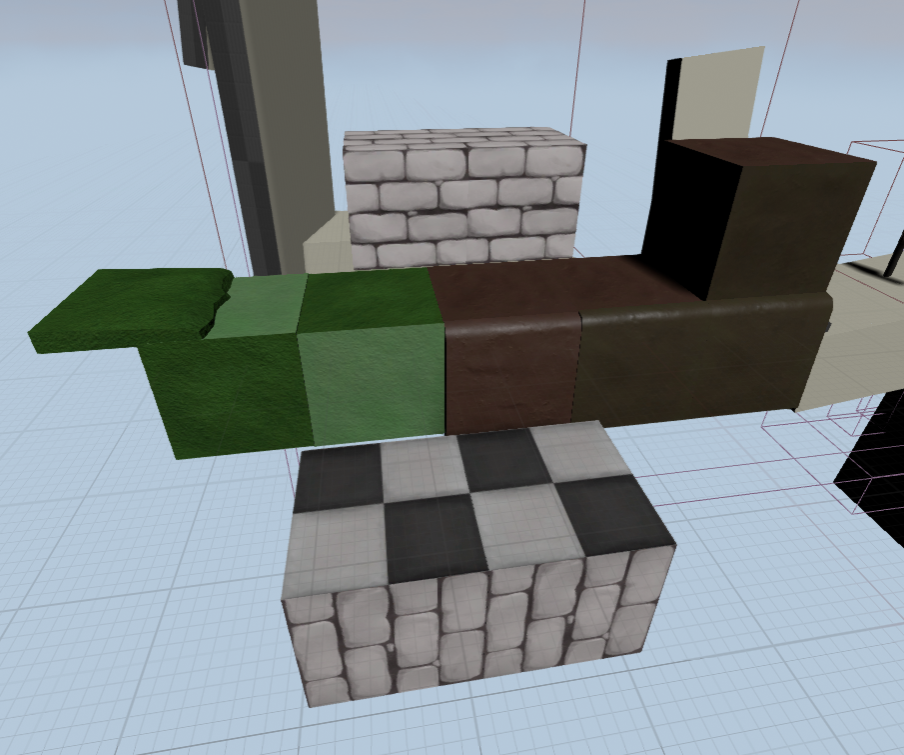
The first issue with this week was going from white box blockouts to something more. How would I do this? Well my first idea was bricks textured in such a way to help the world feel alive.

But after a couple of days working on this I realised it looks... really really bad. So I scrapped this entire idea. This is something I'm starting to get used too, how we just throw ideas away in game art even after working at them.

So I moved onto using Landscapes! Landscapes are an Unreal Engine system that lets you paint earth and ground, then paint materials onto them.
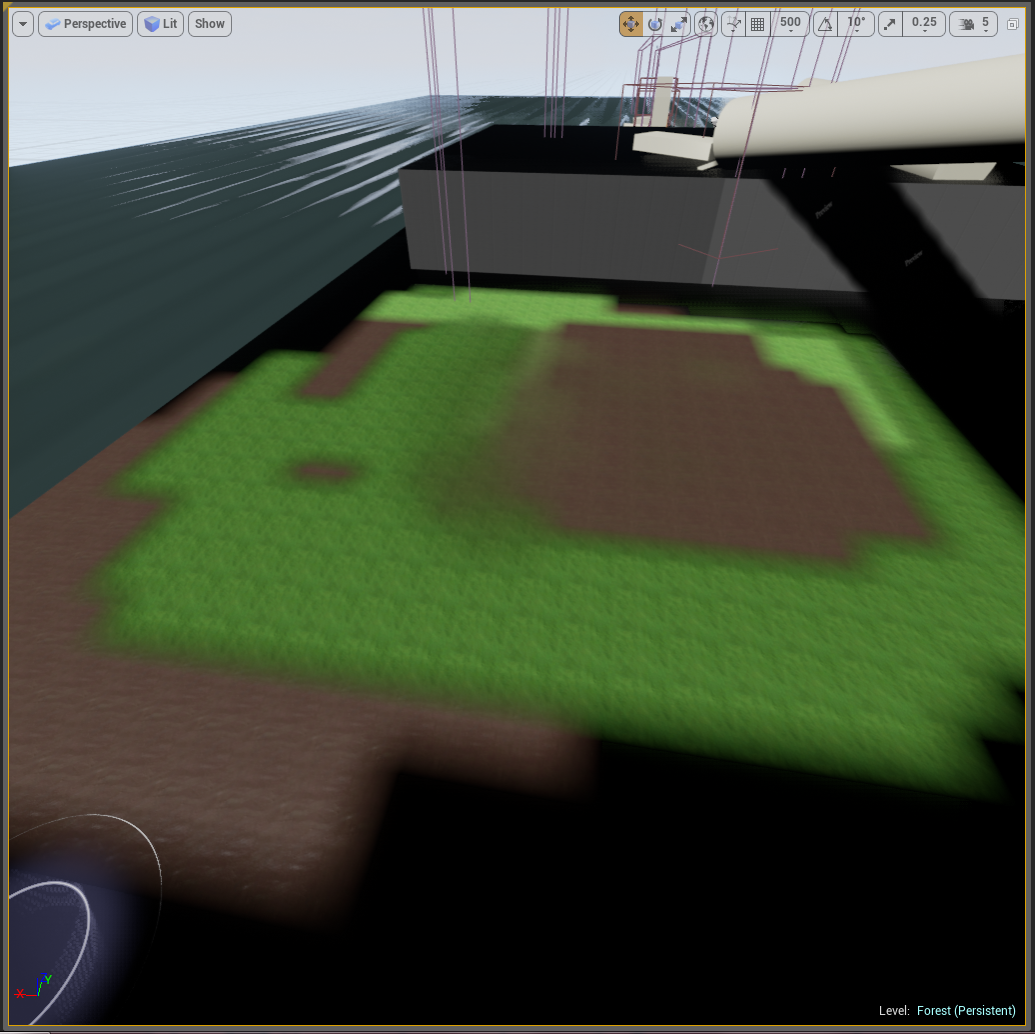
Most of this week has been split between the bricks idea and trying to make the Landscapes work how I want. This turned out to be harder than it sounded. I wanted to use multiple textures on the landscapes but making them work correctly and look good was hard but is now just about in place.

So now the materials start to blend together. This i think is going to be a great base for extra assets, which will be awesome.
Friday, 13 February 2015
Week 21 : All systems operational Captain
Over this last week we went from having basic mechanics to having the basic layout of the game. I've taken the liberty to blockout 4 ACTION PACKED levels of gameplay. Now all we have to do is concept and build assets for it.

This is the first level, the rabbithole. Environment wise this will be underground with lots of rock and dirt. It introduces the gameplay mechanics and how you have to change shape and form to interact with the environment. Originally we were planning to have a lobby system between levels but due to not being able to do it (and frankly it may have broken the flow of the game) we've removed that.
This is the forest level. You may notice it's filled with water, which isn't very forest like. The idea is that the part where Alice's tears flood the world is the introduction to the forest. But as we don't have trees yet of course it doesn't look very foresty. This level has some physics object puzzles including swinging and pushing.

This is the garden level. It's rather short but when playtested it had the players think alittle instead of just run through, so I think thats good. Anyway the plan is once we have a bunch of assets we could easily make these levels longer if needed. This level has alot of moving objects and platforms, aswell as a croquet based puzzle where you kick what will be a hedgehog.

And this is the final level, Back to Reality. I've just been calling it The End. This levels more abstract to show Alice leaving wonderland. Sharply moving platforms and things falling apart and destroying themselves.
So theres the overall jist of the game. The next step, which I'm looking forward to is concepting assets and building them. My job is going to be building the bricks for putting together the levels. I'm not ENTIRELY sure how this will work, So I want to try that out. But the overall art style for the level is down thanks to our concepting artists.

The issue I'm having more is how to design bricks that fit together and look interesting but dont look stupid when together or apart. Luckily our game is going to have a fairly geometric art style so perhaps I can literally have bricks that will slot together? This is what next week will be for me building muddy rocky bricks.
Friday, 6 February 2015
Week 20 : Down the Rabbit-hole
The dawn of a new project is always an interesting time. But this is not just any project; this is the Off The Map competition, in project form. A contest created in part by The British Library to bring literary worlds alive.
This project follows Alice in Wonderland, or more accurately the original transcript of Alice's Adventures Underground. The OG Alice. We're tasked to create a game which is interactive and interesting grounded in this story. It's going to be a challenge, but might have a big pay out.

This of course is a group project. I'm working with brand new people I've never had the fortune of working with before. It's definitely going to be an interesting experience, (though we'll find out if interesting means good or bad later) The thing about this project though is we get the first tastes of being allowed a speciality. Which I'm excited for because it means I get to focus on Engine work!
And it isn't easy. But it is extremely rewarding. Originally we were instructed that this project has to be a side scroller. So we actually stuck in part with this idea. The first step was creating a character who is locked to a following camera but can move in more dimensions. We want to create a game where it works like a side scroller yet the camera can move to show more depth, and there is the possibility for third dimensional movement.


This is what this week has been for me. Getting to know Unreal Engine 4s blueprint system. It's strange but once you get the hang of just how it works you can make some really cool stuff.
We want to make a puzzle like game for example. Where you explore the environment and use Alices different sizes like in the book to do different things. Part of our idea is that Alice should be able to change at will and have 3 completely different forms that work differently.

The way we have the game change between 3 different Alices is by having 3 seperate meshes. Of course right now they're placeholder. By toggling which Alice is visable it gives the illusion of it changing.
But just changing wasnt good enough. I want them to feel very different, so we can have different gameplay mechanics.

So this is my current 'final' design for Alice. As you can see, it got more complex after another day ish of work. Now not only does the game switch meshes, it now edits the size of the collision mesh for the player character to an apropriate size.
This means we can have areas little Alice can only get into. There are also parts for changing how the characters move. Their movespeed and the way they jump. This means little Alice has a very floaty jump which means we can have some awesome gameplay mechanics. The last part is for more interactive parts of the level, where only Big Alice can interact. I'm glad that I've managed to make this work already.
(I did have a video of these in effect but it turns out I'm not a gif maker)
The last major thing I designed over the week is a respawn system. Unlike the previous blue prints this one is based mostly off a tutorial, though tweaked for what I needed.

Looks scary right? Thats only a part of it. This blueprint is in like 5 parts in different areas of different blueprints. Pretty complicated. But worth the time and effort. It means we can have danger in the level and respawn the players appropriately.
So overall with this shortened week (short because of presentations taking up monday and planning all tuesday) I think I've done alot. While my group works on concepting I've started a blockout of how the levels could be played;

Of course it's extremely rough. But its enough to start from. There are still alot of things that need work. The key thing is making the cameras work apropriately. Being able to sweep the camera at key parts, but still follow the player. Its hard because it requires interfacing between the level and the player characters blueprinting. But we can get it done.
Once that is done I can work on more blockouts and designing more puzzles. But over all I'm happy with where I've managed to get.
Saturday, 31 January 2015
Week 19 : Container Autopsy
Get it? Because we made a hospital/morgue for our container city project. I'm having an autopsy instead of a post mortem. Although a post mortem probably still would of worked as a pun anyway.
Yes the Container Project is finished! It was a good one, I thoroughly enjoyed making this level. I only had a small group of three but that allowed us to make a level that was small but perfectly formed.
These are my favourite of the final screenshots I took of the level. Most of my time on this project was spent using Unreal Engine 4, being the engine editor. So basically I put this level together. My team helped of course this was all a team effort, and I say it did damn well.


But screenshots of a immersive interactive level dont just do it justice. The sounds we added and the motion can't really be shown. So here's a video walkthrough.
I'm really glad that we didn't have a huge amount of problems with this project. I started this project somewhat worried because my last group project went horrendously wrong. But our group worked together amazingly well. I think being a smaller group did help with that, so we spent alot of time working together closely in the labs.
Also our time management was really good. Mostly in part to doing a very small level we could get everything done plus some of our stretch goals.We did have several issues but they were mostly with one of our team members having a hard time texturing. But we got it all done in time, and now she's improved her texturing skills doing this project. So everything's gone pretty well!
But we did have strange things break. Working on Engine work always ends up having strange weird issues happen. And we all know that talking about the stuff that went wrong is way better than talking about what went well.

Like our boxes being covered in gunshots when our normal maps got shifted around.

Our generator turning into a strange neon puke machine. This ended up to be an issue with metalness.

And also metalness causing more crazy problems. With having such a small atmospheric level the metalness tended to reflect and change colour alot really strangely. This was no exception. This truck is supposed to be white! But turned brown in the red container walls. That isnt that bad, but the white odd lines on the window caused by overlapping the uvs in the metalness map was a glaring error.
Also those wires you can see coming out of the truck? Thats the only major issue we couldnt fix. Sometimes Unreal does stuff you just cant work out and for no apparent reason these cables and wires just would not show as the right colour. But I let them slide as they look close enough.
Overall I really think this project went well. Our level has the theme and story that we wanted. It feels like part of a real place and we got it all done in time! I feel like doing this project I improved far more in my engine work and its only furthered my feelings that I love working in Engine. It's great fun and I got to learn all sorts of things this time like moving objects, particle effects and atmospheric lighting. Being able to focus on Engine while my team worked more on assets and concepting them I think worked really well.
Bring on more Engine work, I say.
Subscribe to:
Posts (Atom)